AI Image Detection
AI Image Detection checks if an image was likely made by AI and answers Likely AI, Likely real, Can't tell or Edited with AI. Free, no sign-up.
Check an image
Drop an image here, paste a screenshot (Ctrl+V), orChoose a photo or screenshot
JPG, PNG, WebP, GIF or HEIC up to 25 MB · up to 3 free checks a day while capacity lasts · Free checks keep a copy of your image
No image handy? Try a sample:
One quick step (about 2 seconds): tick the box to show you’re a person, and we’ll run the check. Your image is still here.
Your recent checks (only on this device)
Settings
Free checks keep a copy of your image for up to a year so we can measure and improve accuracy. We never sell or share it. Privacy policy
Deletes every image you checked in this browser from our servers.
In our October 28, 2026 retest, the checker identified 78 of 80 AI images and flagged 1 of 40 real photos as AI. This small sample is not a guarantee. How we tested
This free AI image detection tool tells you whether a photo, a screenshot or an image link was likely made by an AI generator, and why. It reads the file's Content Credentials and metadata in your browser first, and only sends the picture to a detection model when those can't settle it. You get a likely answer, a range instead of a fake 100%, and the reasons behind it.
What is AI image detection?
AI image detection is the job of working out whether a picture was made by an image generator, such as OpenAI's GPT Image, Google's Nano Banana, FLUX or Midjourney, or captured by a camera. There are two ways to do it: read the provenance data that some tools write into the file, or ask a detection model trained to spot the traces generators leave in the pixels.
Neither is enough on its own, so a useful check combines both and says which signal it relied on. The four-step check walks through the method, and the visual checklist covers what your own eyes can still catch.
How AI image detection works: four kinds of signal
This checker weighs up to four kinds of evidence, cheapest and most certain first, and stops as soon as one of them settles the question. The first two are read in your browser, the third needs our server, and the fourth is you.
- Content Credentials. Some AI tools and cameras sign the files they create (the C2PA standard). A record saying AI settles it without a model, if the signer is on the C2PA trust lists.
- Metadata. Camera make and model, exposure settings, editing software, and AI-edit markers such as "Edited using Generative AI".
- A detection model. Otherwise the image goes to a model that judges only the pixels: a primary detector with a backup (how we tested).
- Your own eyes. Hands, text, reflections and light still help sometimes (where to look).
Pixel models vs Content Credentials
Content Credentials are a signed record written into the file by the tool that made it: close to proof when present. But a screenshot or a re-upload removes them, and some generators, Midjourney in our test, never write them. A pixel model works on any copy, screenshots included, but its answer is a probability. So credentials come first and a model is called only when they are missing. You can also read an image's credentials on their own.
What the AI image detector tells you
Every check ends in one of four answers: Likely AI-generated, Likely a real photo, Can't tell, or Edited with AI when trusted credentials say an AI tool changed a real picture. A label anyone can write into a file never decides alone: the detection model checks the picture too, and if they disagree the answer is Can't tell. Each comes with its reasons.
- A range, never 100%. Every detector makes mistakes, so our own answers show a range such as 85–98% instead of false certainty.
- The reasons. What the credentials and metadata said, and how the detector scored the image.
- Any way in. Upload, drag and drop, paste a screenshot with Ctrl+V, or paste an image link. JPG, PNG, WebP, GIF and HEIC all work.
- 3 free checks a day while capacity lasts, no sign-up. A check we can't call (Can't tell) doesn't count. It resets at midnight UTC.
- A link you can share. Optional, with or without a thumbnail.
- Report wrong result. If you know better, tell us under the answer. For what each answer means on a photo of a person, see the guide to profile and dating photos.
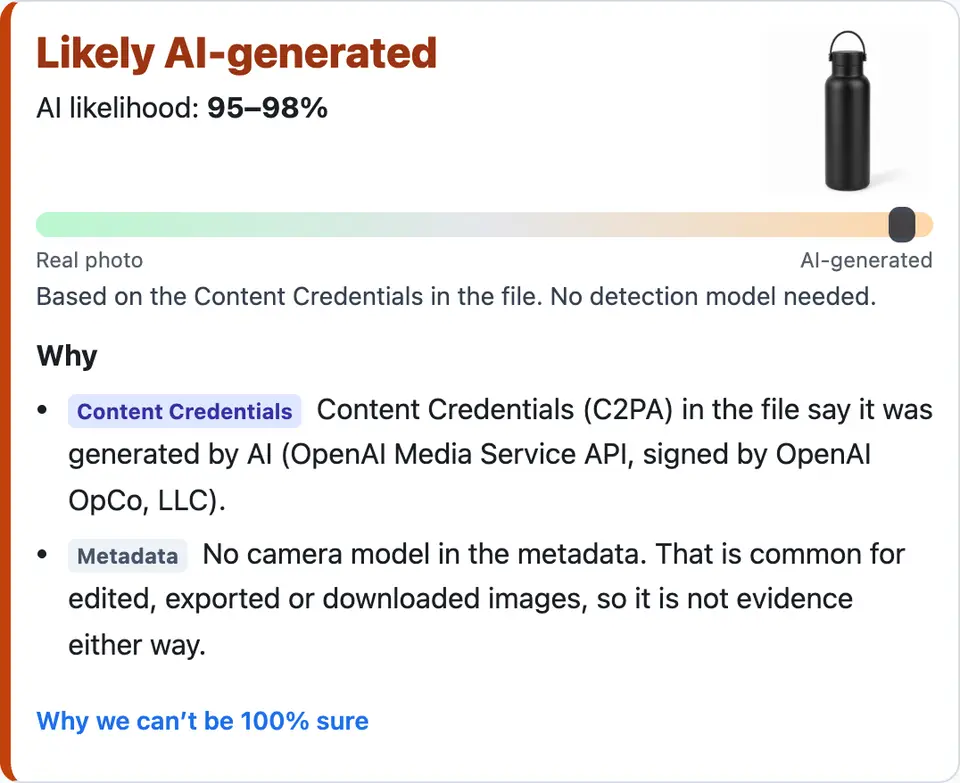
Above is a real result: a GPT Image 2 picture, identified from its Content Credentials without a model call.
How accurate is AI image detection?
In our October 28, 2026 retest, the checker identified 78 of 80 AI images. The other 2 returned Can't tell; none was called a real photo. Of 40 real photos, 38 returned Likely real, 1 returned Can't tell and 1 was incorrectly flagged as AI. This small sample is not a guarantee.
The test used 20 images each from GPT Image 2.5, Nano Banana 2.1/2/Pro, FLUX.3/FLUX.2 and Midjourney V7. GPT Image and Nano Banana were detected in all 20 cases each; FLUX and Midjourney each had 1 uncertain result. We report a separate group of 20 community Midjourney posts separately because their generator version could not be verified. Read the accuracy report for the method, source limits and uncertainty ranges.
AI image detector vs other detectors
Compare detectors using the same images and a fixed decision policy. Keep missed AI images, false alarms on real photos and uncertain results separate: one headline percentage can conceal the mistakes that matter to you.
Our latest test is the October 28, 2026 retest described above. We ran it ourselves, so it is not independent certification. The accuracy report publishes the source limits and uncertainty ranges; the comparison guide explains what to look for when evaluating a checker.
Where AI image detection helps
AI image detection is most useful when a picture is being used as evidence: of who someone is, of what condition something is in, or of what happened. In each case the answer is one signal to weigh, never a verdict on a person.
- Dating and social profiles. Check a photo that looks too perfect before you share anything personal (photos of people).
- Hiring and remote interviews. If a candidate's headshot looks unlike the person on the call, a check can tell you whether the photo itself was generated. Treat the result as a reason to ask, not to reject.
- Refund claims and product photos. Check a "damaged item" photo before you decide (product shots and memes).
- News and viral images. Check a picture before you repost it, then look for the earliest version. Screenshots need extra care.
- Rental and property listings. A flat that looks like a showroom is worth a check before you send a deposit.
- Art contests and classrooms. A check can be a first step for judges and teachers, as long as artists get a fair way to show their process.
When AI image detection gets it wrong
Detectors make mistakes in both directions, and the costly one is calling a real photo AI. It can hurt a buyer with a genuine refund claim, an artist who drew every line, or a date who simply looks good in photos. Treat Likely AI-generated as a reason to ask for more evidence, not as proof.
Mistakes are more likely on screenshots and compressed copies, on illustrations and 3D renders, which we tested little, and on real photos partly edited with AI. Artists whose work is flagged can find what to do next. If you think a result is wrong, use Report wrong result under the answer; reports are how we measure our real-world error rate. And take Can't tell as a real answer.
Privacy: what happens to your image
Free checks keep a copy of the image you check, with the result, for up to 365 days on Cloudflare. We use the copies to measure and improve accuracy, see what kinds of images people check, and prevent abuse. We never sell or share them or use them to train image generators, and you can delete yours any time with Delete my images in the tool's settings or by emailing hello@aiimagedetection.app.
Private checks, part of the paid credit packs, never store the image: only its fingerprint and the verdict. If the primary detector is down or out of checks, the image goes to a second detection service under its own terms; if that fails too, our self-hosted backup processes it in memory without retaining it. An AI service labels each stored image with a short description, such as portrait, product photo or screenshot. Sharing a result is optional, its thumbnail can be switched off, and you can delete the shared page later. Details are on the privacy page. If you only want the provenance record, the Content Credentials checker never sends your image anywhere.
Check an image now
Go back to the AI image detector at the top. 3 free checks a day while capacity lasts, no account needed (it resets at midnight UTC).
Frequently asked questions
Is this AI image detection free?
Yes. You get 3 free checks a day without signing up, while that day's capacity lasts; it resets at midnight UTC, and a check that ends in Can't tell doesn't use one. Signing in with Google is optional: it keeps bought credits on all your devices. Late in the day the free checks can run out: your first check of the day goes first, and you can leave your email to get the result when checks return. Images settled by their Content Credentials, and images someone already checked, don't use one. The credentials checker runs entirely in your browser and never sends your image to a detection model.
What is the best free AI image detector?
It depends on what you need. This one needs no sign-up, gives 3 free checks a day while capacity lasts, reads Content Credentials before calling a detection model, works on screenshots and image links, and shows a likelihood range with its reasons instead of a fake 100%. No detector is always right: in our latest test it flagged 1 of 40 real photos as AI. Free checks keep a copy of the image for up to 365 days; paid private checks don't. If you need an API or bulk checks, a commercial detection service will suit you better.
Does AI image detection work on screenshots?
Yes, with some loss. Screenshots carry no Content Credentials (none of the 10 in our test did), so the answer comes from the detection model alone. In our first test it still caught 9 of 10 AI screenshots, against 10 of 10 originals. More on screenshots.
Which AI generators can AI image detection catch?
In our October 28, 2026 retest on the newest generators (OpenAI GPT Image 2.5, Google Nano Banana 2.1, 2 and Pro, FLUX.3 and FLUX.2, and Midjourney V7), the checker answered Likely AI for 78 of 80 AI images and called none a real photo; the other 2 (one FLUX, one Midjourney) came back Can't tell. It flagged 1 of 40 real photos as AI. Twenty images per generator is a small sample: a check, not a guarantee. The accuracy report has the numbers for each generator, including Seedream and Stable Diffusion XL.
What does Edited with AI mean?
The file's credentials or metadata say an AI tool changed it, for example by removing an object or filling in part of the picture. It usually means a real photo was retouched with AI, not generated from scratch.
Is there an AI image detection API?
Not yet. Checks run on this page only, with no public API or bulk upload. If you need to check images at volume, commercial detection services sell API access directly; the API guide explains what to look for.
More tools
- AI Art Detector: Checking Artwork Without Wronging Artists
- AI-Generated Damage Photos
- AI Image Detector Accuracy: October 2026 Retest
- AI Metadata Checker
- AI Photo Detector for Profile, Dating and Listing Photos
- AI Picture Detector: What It Catches and What It Can't
- AI vs Real Images: 11 Examples Side by Side
- ChatGPT Image Detector
- Content Credentials Checker
- FLUX AI Image Detector
- How to Tell If an Image Is AI-Generated by Eye
- Is This Image AI-Generated? A Four-Step Check
- Is This Photo AI? Checking a Viral Picture or Screenshot
- Is This Real or AI? How to Check a Picture You Saw Online
- Midjourney Detector
- Nano Banana Detector
- OpenAI Image Verification: What OpenAI's Checker Can Confirm
- AI Image Detection Pricing
- Seedream Detector
- Stable Diffusion Detector